Eligibility Compass Quickstart Guide
Introduction
This quickstart guide provides information on how to integrate with Nova Credit and use the API to retrieve Eligibility Compass reports. Nova Credit provides a secure, plug and play iFrame module called NovaConnect to make integrating both user flows quick and easy.
NovaConnect is secure, quick to integrate, and easy to use.
Nova Credit takes care of customizing the form and handling errors with data vendors so that you don't have to.
Once a user has successfully gone through the NovaConnect flow(s), you can use a server-side integration to retrieve Eligibility Compass reports and associated files.
Credentials & Identifiers
Account Keys
The NovaConnect and server-side API keys are accessible from your Nova Credit Dashboard.
publicId [string]Used when integrating NovaConnect to identify your account.clientId [string]Your Nova Credit API identifier. You will use this to programmatically access resources.secretKey [string]Your Nova Credit API key (keep this secret). You will use this to programmatically access resources.
Key rotation can either be done manually in your Nova Credit Dashboard or automated with the Credentials API. Access to the Credentials API is forbidden by default. Contact your Nova Credit representative to learn more.
Programmatically generated tokens
publicToken [string]Identifies a specific Eligibility Compass report.accessToken [string]Used to authorize server-side requests (keep this secret). You will use the /accesstoken endpoint to generate anaccessTokeneach time you fetch the Eligibility Compass report.
Sandbox & Production Environments
Nova Credit provides two environments: one suitable for developing and testing your integration and one for production requests. The former provides a safe place for you to access Nova Credit's resources and test different response types using dummy data.
Both environments have their own endpoint, publicId, clientId, secretKey, publicTokens, and accessTokens. Please be sure to use the correct endpoint and credentials for the resource's environment you are requesting. Using the wrong endpoint, credentials, or tokens for the specified environment usually leads to errors such as UNKNOWN_CUSTOMER.
Available environments
sandboxSuitable for development and testing.productionUse for production-level interactions with applicants and suppliers.
There are two URLs that may be used to access API calls: api.sandbox.novacredit.com for sandbox testing, and api.novacredit.com for production data. Note that the examples in the docs use the production URL, so this should be
changed to the sandbox URL for development and testing.
Client-Side Integration
The steps outlined below explain how to embed NovaConnect within your application. If you prefer the application to be hosted on a Nova Credit page, you can instead utilize the Invite or Invite Link endpoints.
Step 1: Product configuration
To help you identify which product an applicant has applied for, you first have to create a productId using your Nova Credit Dashboard account.
To create a product, login to your Nova Credit Dashboard account, click on the Products tab and click 'Add a Product'. Once you have created your products, you can view their productIds by clicking the Developer tab and Product IDs. Alternatively, you can use the Config API.
Step 2: Add NovaConnect to your page
See below for a minimal code example of how to configure NovaConnect. The token shown here is a single-use initialization token; see Step 3 below for how to retrieve it.
<html>
<head>
	<!-- Other head files here -->
	<script src="https://static.novacredit.com/connect/v2/init.js"></script>
</head>
<body>
	<div id="nova-embed"></div>

	<script>
		window.Nova.register({
			env: 'sandbox',
			publicId: 'your_sandbox_public_id',
			productId: 'your_sandbox_product_id',
			token: 'your_initialization_token'
		});
	</script>
</body>
</html>
Let's walk through this.
Firstly, you will need to add init.js, a script-tag that should be loaded inside your HTML's <head></head>.
Secondly, you will need an unstyled div in which NovaConnect can render. Add this div where you would like the NovaConnect widget to appear, and give it the id nova-embed. The NovaConnect widget will render inline as an embedded widget alongside other elements of your application.
Lastly, you will need to add a script that configures and initiates the rendering of the NovaConnect experience at the bottom of your HTML body. The relative order of the div and scripts placements is important.
Custom Trigger Version
Alternatively, NovaConnect can be triggered using a custom element. NovaConnect will render as a modal that will appear on top of your application. For this alternate experience, the relevant code is provided below.
<html>
<head>
    <!-- Other head files here -->
    <script src="https://static.novacredit.com/connect/v2/init.js"></script>
</head>
<body>
    <!-- Button or embedded widget placement div -->
    <button onclick="window.Nova.fire()">Open NovaConnect</div>

    <script>
        window.Nova.register({
            env: 'sandbox',
            publicId: 'your_sandbox_public_id',
            productId: 'your_sandbox_product_id',
            useManualFire: true
        });
    </script>
</body>
</html>
There are two notable differences in this snippet as compared to the embedded version of NovaConnect:
<div id="nova-embed"></div>is replaced by a button on your application page. This styling and content of the button can be configured to meet your needs as long as it callswindow.Nova.fire()when clicked.- Pass an additional
useManualFire: trueas a parameter towindow.Nova.registerto signal to NovaConnect that a custom button is being used to launch the experience.
NovaConnect Required Parameters
env [string]Eithersandboxorproduction.productId [string]See Step 1.publicId [string]Specific to your account. Found on the Nova Credit Dashboard.token [string]A single-use initialization token retrieved from the Initialization Endpoint. See Step 3 below.
NovaConnect Optional Parameters
externalId [string]Pass in the unique applicant identifier from your system. This will be returned in our webhook call and in the API JSON response. You can use this identifier to match the Nova Credit public token (Nova Credit report identifier) with the applicant in your system. Note that this MUST be unique and MUST NOT include any consumer PII. Max length 64 characters.userArgs [string]Any additional metadata to associate with the report. This will be returned in our webhook call and in the API JSON response. Max length 255 characters.sandboxReportId [string]A UUID identifying a custom sandbox report to use for testing. When provided, NovaConnect will automatically complete using the specified sandbox report instead of the normal flow. Only available in thesandboxenvironment. Contact your Nova Credit representative to configure custom sandbox reports.
Step 3: Initialize NovaConnect with a token
Before an applicant can launch NovaConnect, retrieve a single-use initialization token by calling the Initialization Endpoint from your server, then pass it to window.Nova.register(...) as the token parameter. Any applicant information should be sent to the Initialization Endpoint rather than passed on the client side.
Step 4: Use Client-Side Hooks
You may use the onSuccess, onError, and onExit client-side hooks to know when an applicant has finished their interactions with NovaConnect. As examples, you may use these hooks to alter content on your application page or route the applicant elsewhere when the applicant finishes NovaConnect.
onSuccess
onSuccess() gets called when the applicant completes the entire NovaConnect journey and attempts to pull their Eligibility Compass report. onSuccess is called with the parameters (publicToken, status).
onExit
onExit() is called when the applicant voluntarily closes NovaConnect, whether or not they completed the entire NovaConnect journey. onExit is called with the parameter (publicToken), if it exists. This hook will not be fired if the applicant navigates away from your application page without closing NovaConnect.
onError description & error types
onError() gets called when there was an internal error or an applicant was unable to complete the entire NovaConnect journey. onError is called with the parameters (publicToken, errorType). Public token is the Nova report unique identifier for this applicant.
Error types will be one of the following; if no error type is provided (null or undefined), this implies an internal Nova error:
| Error | Description |
|---|---|
DUPLICATE_EXTERNAL_ID | The specified externalId is already in use by another report for the customer. |
INTERNAL_ERROR | Nova Credit encountered an error internally. |
INVALID_CONSUMER_ID | The consumerId provided does not match a valid consumer, or both consumerId and prefill parameters have been provided together, which is not allowed. |
INVALID_PREFILLS_PII_MISSING | Prefills required are missing. |
INVALID_PREFILL_KEY | A prefill field has been passed in that is not supported for the current API version. (Only returned in sandbox.) |
INVALID_PREFILL_ADDRESS | The address sent via prefill must be a string with max length 100 characters and contain a valid street address. |
INVALID_PREFILL_CITY | The city sent via prefill must be a string with max length 100. |
INVALID_PREFILL_DOB | The birthday sent via prefill is missing or not in YYYY-MM-DD format. |
INVALID_PREFILL_EMAIL | The email sent via prefill must be a valid email with max length 100 characters. |
INVALID_PREFILL_FIRST_NAME | The first name sent via prefill must be a string less than 255 characters and contain only alphabetical, unicode, dots, apostrophes and dashes. |
INVALID_PREFILL_LAST_NAME | The last name sent via prefill must be a string less than 255 characters and contain only alphabetical, unicode, dots, apostrophes and dashes. |
INVALID_PREFILL_INCOME | The stated annual income sent via prefill must be an integer between 0 and 2147483647. |
INVALID_PREFILL_PHONE | The phone number sent via prefill must be a string with max length 255 characters. |
INVALID_PREFILL_STATE | The state sent via prefill is missing or not in a valid two letter US state or territory code. |
INVALID_PREFILL_STATED_EMPLOYER_NAMES | The stated employer names sent via prefill must be an array of strings with a minimum of 1 name and a maximum of 6 names. |
INVALID_PREFILL_ZIP | The zip code sent via prefill must a string with a valid US zip code. |
INVALID_PRODUCT | The productId does not match any products for the customer. |
INVALID_TOKEN | The initialization token provided was invalid or expired, or both token and prefill parameters have been provided together, which is not allowed. |
MISMATCHED_PRODUCT_ID | The productId provided does not match the productId used to create the initialization token |
REQUEST_TIMEOUT | The request to the server has timed out. |
UNKNOWN_CUSTOMER | The publicId provided does not match a valid customer. |
SUPPLIER_ERROR | Nova credit encountered an error specific to the supplier. |
Step 5: Cleanup
If you are embedding NovaConnect inside of an application you may call window.Nova.destroy() to remove the widget and init script from the DOM.
Full Example
The following HTML file utilizes the full list of configuration options.
<html>
	<head>
		<!-- Other head files here -->
		<script src="https://static.novacredit.com/connect/v2/init.js"></script>
	</head>
	<body>
		<script>
			window.Nova.register({
				env: 'sandbox',
				publicId: '18efe5b7608fed4c91ff9c',
				productId: 'e0c59fc0-86c4-11e8-8d8b',
				token: 'your_initialization_token',

				useManualFire: true,
				externalId: '5645cbfc-5331-4d3d-aee3-0d5e27463c4f',
				userArgs: 'your_applicant_id',
				onSuccess: function (publicToken, status) {
					// Applicant has completed NovaConnect and a webhook will be called
					console.log(publicToken, status);
				},
				onExit: function () {
					// Applicant exited the NovaConnect widget
					console.log('Applicant exited NovaConnect');
				},
				onError: function (publicToken, error) {
					// Applicant was unable to complete NovaConnect
					console.log(publicToken);
					console.log('Applicant encountered an internal error', error);
				},
			});
		</script>
		<!-- Button to open the NovaConnect widget -->
		<button onclick="window.Nova.fire()">Open Widget</button>
	</body>
</html>
Pass prefill info into NovaConnect
This client-side prefill approach is not recommended. Provide applicant information to the Initialization Endpoint and pass the returned token to NovaConnect instead (see Step 3).
Rather than a token, you may pass one of the following directly to window.Nova.register(...). Do not pass both, as these parameters are mutually exclusive:
prefill [object]Prefill specific fields for the applicant by passing an object which maps keys to string values. See the prefill keys below.consumerId [string]Pass in a consumer ID to associate this visit with an existing consumer. See NovaConnect Consumers Endpoints for more information.
See below for a minimal example that passes prefill on the client side.
<html>
<head>
	<!-- Other head files here -->
	<script src="https://static.novacredit.com/connect/v2/init.js"></script>
</head>
<body>
	<div id="nova-embed"></div>

	<script>
		window.Nova.register({
			env: 'sandbox',
			publicId: 'your_sandbox_public_id',
			productId: 'your_sandbox_product_id',
			prefill: {
				dob: '1995-10-01',
				email: 'raymond@email.com',
				firstName: 'Raymond',
				lastName: 'Marshal',
				state: 'CA',
				statedEmployerNames: ["Raymond's Designs"]
			}
		});
	</script>
</body>
</html>
Prefill Keys
Required keys
firstName [string]The first name of the applicant. Less than 255 characters and contain only alphabetical, unicode, dots, apostrophes and dashes.lastName [string]The last name of the applicant. Less than 255 characters and contain only alphabetical, unicode, dots, apostrophes and dashes.dob [string]The applicant's date of birth, in the formatYYYY-MM-DD.email [string]The email address of the applicant. Max length 100 characters.state [string]The two letter US state or territory code where the applicant lives.statedEmployerNames [array of strings]The names of the applicant's current employers, with a minimum of 1 name and a maximum of 6 names. Note: This is optional if using the Assets Only workflow.
Optional Keys
phone [string]The phone number of the applicant. Max length 255 characters.address [string]The street address of the applicant. Max length 100 characters.city [string]The city where the applicant lives. Max length 100 characters.zip [string]The US postal zip code where the applicant lives.statedAnnualIncome [integer]The annual income in dollars as stated by the applicant. Must be an integer between 0 and 2147483647.
Server-Side Integration
Step 1: Set-up your webhooks
As an applicant goes through the NovaConnect flow, Nova Credit will automatically POST to your provided callback endpoint to update you on the status of the Eligibility Compass report tied to the publicToken.
For example, if the applicant completes NovaConnect and Nova Credit is able to successfully compile a report, Nova Credit will make a POST API call to your endpoint.
You must set your webhook callback url and webhook subscriptions in the Nova Credit Dashboard via the Developer tab.
For security, the Eligibility Compass report is not provided directly in the callback; instead, the callback provides a unique identifier called a public token, which you will use to retrieve a Eligibility Compass report in a separate call. For more information regarding the webhook body, please view the API Docs.
Step 2: Get an access token
If the webhook status was SUCCESS, you should now make a request to Nova Credit's servers to retrieve the Eligibility Compass report. In order to do so, you will need to first fetch an access token using your Nova Credit client id and secret key. Access tokens are time-scoped to prevent malicious usage should someone obtain one. You should retrieve a new access token each time you intend to retrieve a Eligibility Compass report.
GET https://api.novacredit.com/connect/accesstoken
Required headers
AuthorizationBasic Auth, containing thestrict base-64encoded string of yourclient_id:secret_key(ensure you use the corresponding client id and secret key to the environment you define).
Possible responses
200 (OK)BothaccessTokenandexpwill be returned400 (Bad Request)Malformed request or missing required parameters. Error will beMALFORMED_HEADERS.403 (Forbidden)Unauthorized request. Yourclient_idorsecret_keywas incorrect, or you did not correctly base-64 encode it.
The response body will be a JSON containing the following keys:
accessTokenThe access token you can now use to retrieve a Eligibility Compass report withexpWhen the access token will expire, provided as a unix timestamp. Access tokens have a lifetime of 5 minutes. If you do not retrieve the Eligibility Compass report before the access token expires, you will need to request a new access token.
Example request
require('request').request(
	{
		url: 'https://api.novacredit.com/connect/accesstoken',
		method: 'GET',
		headers: {
			Authorization: 'Basic ' + Buffer.from('<Your client_id>:<Your secret_key>').toString('base64'),
		},
	},
	function (err, res, body) {
		const { accessToken } = body;
		// See below for next steps to fetch the report
	},
);
Example response
{
	"accessToken": "eyJhbGciOiJIUzI1NiIsInR5cCI6IkpXVCJ9.eyJpYXQiOjE3MjMyNTQwNjksImV4cCI6MTcyMzI1NDM2OSwiY2xpZW50X2lkIjoiNjFhNDdiMDQtZWIyMy00YWNlLWE2OWQtYzg4OWI5YjExYTRjIiwiZW52Ijoic2FuZGJveCJ9.HVlHgidZdi2-qY92zhE-MmLYNNqnuIBAoRapA6rbM78",
	"exp": 1526077901
}
Step 3: Request an Eligibility Compass report
Now you can use the access token and public token to retrieve the report.
Once you have fetched an access token, simply make a GET request to the AFH endpoint using the accessToken that you obtained in the previous step and the publicToken (unique identifier for the report) provided by the webhook. Make sure to encode the accessToken using base 64.
GET https://api.novacredit.com/connect/eligibility-compass/v1/json
The JSON endpoint will return the AFH report directly in the response body. Depending on your web application framework, you may need to convert the response body into a JSON object, such as JSON.parse(res.body).
If the requested report is over 90 days old, the endpoint will return an INVALID_TOKEN error.
Required headers
- One of the following identifiers:
X-PUBLIC-TOKENThe unique identifier of the report you are retrieving, provided to you via webhook.X-EXTERNAL-IDThe unique applicant identifier from your system that was sent to Nova Credit.X-PUBLIC-IDis a required header if you choose to useX-EXTERNAL-IDas an identifier and are making this request using a Parent account. This value is thepublic_idof the child account that owns the report found on your Nova Credit Dashboard.
AuthorizationBearer Auth, containing thestrict base-64encoded string of the validaccessTokenyou retrieved in Step 2.
Example request for an AFH report
require('request').request(
	{
		url: 'https://api.novacredit.com/connect/eligibility-compass/v1/json',
		method: 'GET',
		headers: {
			Authorization: `Bearer ${Buffer.from('eyJhbGciOiJIUzI1NiIsInR5cCI6IkpXVCJ9.eyJpYXQiOjE3MjMyNTQwNjksImV4cCI6MTcyMzI1NDM2OSwiY2xpZW50X2lkIjoiNjFhNDdiMDQtZWIyMy00YWNlLWE2OWQtYzg4OWI5YjExYTRjIiwiZW52Ijoic2FuZGJveCJ9.HVlHgidZdi2-qY92zhE-MmLYNNqnuIBAoRapA6rbM78').toString('base64')}`,
			'X-PUBLIC-TOKEN': '829de2f0-fe06-405b-a18f-3d31641ccb3b',
		},
	},
	function (err, res, body) {
		// Parse AFH Report
	},
);
View our API Docs for details and examples of the contents of the AFH report.
Requesting files associated with a report
Some sources in a report include a source_filepath that can be used to retrieve a file associated with that report. These files can be downloaded by making a GET request to the AFH files endpoint using the same accessToken used to get the report and the publicToken provided by the webhook. Make sure to encode the accessToken using base 64.
GET https://api.novacredit.com/connect/eligibility-compass/v1/files/<filepath>
If the requested report is over 90 days old, the endpoint will return an INVALID_TOKEN error.
Required headers
X-PUBLIC-TOKENThe unique identifier of the report you are retrieving, provided to you via webhook.AuthorizationBearer Auth, containing thestrict base-64encoded string of the validaccessTokenyou retrieved in Step 2.
Possible responses
200 (OK)File is found and returned.403 (Forbidden)Unauthorized request.400 (Bad Request)Malformed request, headers or missing required parameters.404 (Not Found)File was not found. This could be because theX-PUBLIC-TOKENwas not correct, or because thefilepathis incorrect.410 (Gone)File is no longer available.
Example request
require('request').request(
	{
		url: 'https://api.novacredit.com/connect/eligibility-compass/v1/files/f3f0d372-a0f7-402f-835e-67ce6db2a75f/866c943a-8e0b-45c6-b381-53712c2809a2.pdf',
		method: 'GET',
		encoding: null,
		headers: {
			Authorization: `Bearer ${new Buffer('<valid access token>').toString('base64')}`,
			'X-PUBLIC-TOKEN': '812dfac3-ce5a-4da3-843b',
		},
	},
	function (err, res, body) {
		fs.writeFile('paystub.jpg', body, function (err) {
			if (err) {
				throw err;
			}
			console.log('DONE');
		});
	},
);
Look up files uploaded by the consumer
It is possible to view a list of all files associated with their application, even if that application did not result in a report (e.g.the status was not a SUCCESS).
This is done by making a GET request to the Eligibility Compass report files endpoint, using the same accessToken the publicToken associated with the report.
The source_filepath for each file then can be used with the /files/<filepath> endpoint above to download the file.
GET https://api.novacredit.com/connect/eligibility-compass/v1/files
If the requested report is over 90 days old, the endpoint will return an INVALID_TOKEN error.
Required headers
X-PUBLIC-TOKENThe unique identifier of the report you are retrieving, provided to you via webhook.AuthorizationBearer Auth, containing thestrict base-64encoded string of the validaccessTokenyou retrieved in Step 2.
Possible responses
200 (OK)List of files is returned. Note that if no files are associated with the publicToken, this will be an empty list.403 (Forbidden)Unauthorized request.400 (Bad Request)Malformed request, headers or missing required parameters.404 (Not Found)InvalidX-PUBLIC-TOKEN.
Response body
| Field | Format | Notes |
|---|---|---|
document_type | String | The type of document uploaded. See document_type |
document_id | String | The unique identifier of the document uploaded. |
source_id | String | The identifier for the source that this document was uploaded for. |
source_uuid | String | The identifier for an individual record within a source. |
source_filepath | String | The file path used for downloading the file |
Example request
require('request').request(
	{
		url: 'https://api.novacredit.com/connect/eligibility-compass/v1/files',
		method: 'GET',
		encoding: null,
		headers: {
			Authorization: `Bearer ${new Buffer('<valid access token>').toString('base64')}`,
			'X-PUBLIC-TOKEN': '812dfac3-ce5a-4da3-843b',
		},
	},
	function (err, res, body) {
		if (err) {
			throw err;
		}
		console.log('DONE', body);
	},
);
Example response
In this example, the first file is a paystub pulled from our payroll provider. The second and third files are documents uploaded by the consumer.
[
	{
		"document_type": "PAYSTUB",
		"document_id": "550e8400-e29b-41d4-a716-446655440000",
		"source_id": "USA_ARGYLE",
		"source_uuid": "a3bb189e-8bf9-3888-9912-ace4e6543002",
		"source_filepath": "65bf7135-4eb8-4342-a7c2-0380322b3d59/550e8400-e29b-41d4.pdf"
	},
	{
		"document_type": "DOCUMENT",
		"document_id": "f8e9d0c1-b2a3-4567-8901-234567890abc",
		"source_id": "NOVA_DOCUMENT",
		"source_uuid": "fedcba98-7654-4321-b098-76543210fedc",
		"source_filepath": "fedcba98-7654-4321-b098-76543210fedc/f8e9d0c1-b2a3-4567-8901-234567890abc.pdf"
	},
	{
		"document_type": "DOCUMENT",
		"document_id": "12345678-9abc-4def-8012-3456789abcde",
		"source_id": "NOVA_DOCUMENT",
		"source_uuid": "fedcba98-7654-4321-b098-76543210fedc",
		"source_filepath": "fedcba98-7654-4321-b098-76543210fedc/12345678-9abc-4def-8012-3456789abcde.pdf"
	}
]
Example where no documents were uploaded:
[]
Regenerated Reports
If there is an issue with a generated Eligibility Compass report, particularly incorrect calculations or a value that was misinterpreted and corrected by a supplier, it may be regenerated by Nova Credit. Please reach out to your Nova representative if there is a report that needs to be regenerated.
If a report is regenerated:
- A
REGENERATED_VISITtype webhook will be sent. You'll receive it if you are subscribed to webhooks. - In the updated report, both
meta.nova_report_revisionandmeta.nova_report_revision_created_atwill be set.
Webhooks Alternative: /status Endpoint
As an alternative to using webhooks to inform when a report is ready, we have a status endpoint that returns the current status and substatus of the report. While the report is being compiled, it will return a PENDING status, and once the status returned is a SUCCESS, you may proceed to fetch the report JSON. The endpoint may also return non-success statuses and substatuses for cases when the report could not be generated.
GET https://api.novacredit.com/connect/status
If the requested report is over 90 days old, the endpoint will return an INVALID_TOKEN error.
Required headers
- One of the following identifiers:
X-PUBLIC-TOKENThe unique identifier of the report you are retrieving, provided to you via webhook.X-EXTERNAL-IDThe unique applicant identifier from your system that was sent to Nova Credit.X-PUBLIC-IDis a required header if you choose to useX-EXTERNAL-IDas an identifier and are making this request using a Parent account. This value is thepublic_idof the child account that owns the report found on your Nova Credit Dashboard.
AuthorizationBearer Auth, containing thestrict base-64encoded string of the validaccessTokenyou retrieved previously.
Example request
require('request').request(
	{
		url: 'https://api.novacredit.com/connect/status',
		method: 'GET',
		headers: {
			Authorization: `Bearer ${Buffer.from('eyJhbGciOiJIUzI1NiIsInR5cCI6IkpXVCJ9.eyJpYXQiOjE3MjMyNTQwNjksImV4cCI6MTcyMzI1NDM2OSwiY2xpZW50X2lkIjoiNjFhNDdiMDQtZWIyMy00YWNlLWE2OWQtYzg4OWI5YjExYTRjIiwiZW52Ijoic2FuZGJveCJ9.HVlHgidZdi2-qY92zhE-MmLYNNqnuIBAoRapA6rbM78').toString('base64')}`,
			'X-PUBLIC-TOKEN': '829de2f0-fe06-405b-a18f-3d31641ccb3b',
		},
	},
	function (err, res, body) {
		const { status, substatus } = body;
	},
);
Example responses
{
	"status": "PENDING"
}
{
	"status": "SUCCESS",
	"substatus": "NO_USABLE_INCOME_INFORMATION"
}
Visit our API Docs for the full list of statuses and substatuses.
Parent Configuration via API
If your account has been configured as a “Parent”, that allows you to leverage a hierarchy framework wherein then you can create multiple customer accounts and products, as represented in the diagram below.
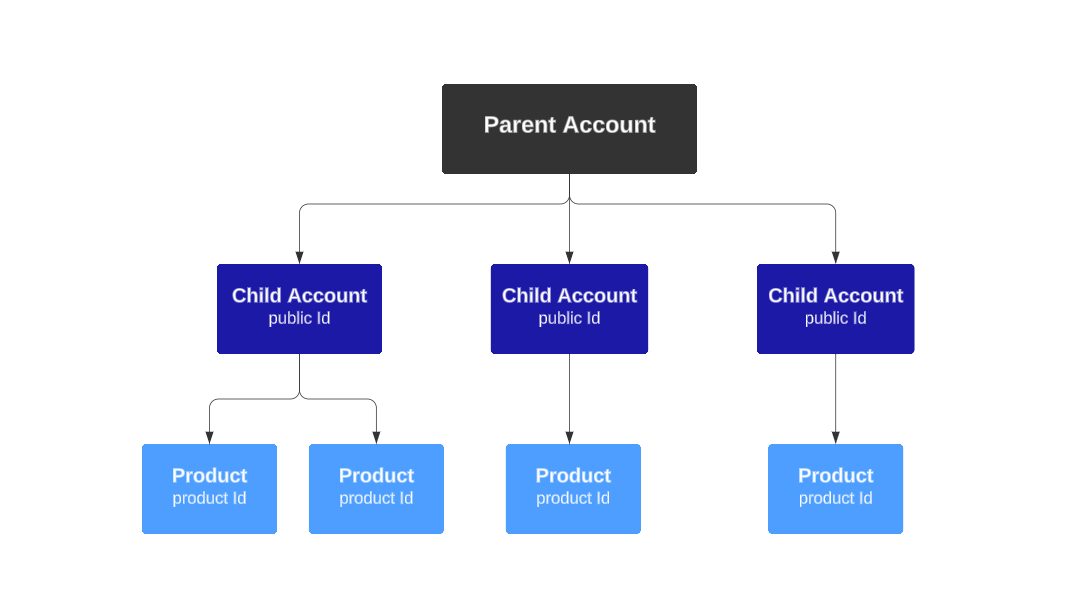
- Each child account has its own
publicId - Each child account can have one or more products. Each Product has its own
productId.
This can be configured for you by your Nova Representative, or can be done via the Nova Credit Dashboard. However, if you have a large account, there is also an option to do this via API. If you would like to learn more about it, you may visit this page for full documentation.
Encrypted Payload Implementation
In addition to securing endpoints with TLS/SSL, some of Nova Credit's endpoints offer payload encryption.
- Customer generates a Content Encryption Key (aka “CEK” or “session key”), which is an AES 256-bit key.
- The request body JSON (aka the “payload” or “plaintext”), is encrypted using the Content Encryption Key.
- The Content Encryption Key is encrypted using Nova Credit's RSA public key.
- The encrypted payload is sent with the encrypted CEK and parameters in the JWE Compact Serialization Format.
GET /connect/jwkset
Nova Credit uses the JSON Web Keys (JWK) format to publish our public keys. The response currently contains two keys:
payloadEncrRsa(use: enc) — RSA public key used to encrypt payloads sent to Nova Credit.payloadSignRsa(use: sig) — RSA public key used to verify JWTs signed by Nova Credit.
Note that this endpoint should be called each time a payload is to be encrypted or a signature is to be verified, since we will regularly rotate keys.
GET https://api.novacredit.com/connect/jwkset
Required headers
Content-Typeapplication/json.
Possible responses
200 (OK)Returns an array of keys400 (Bad Request)Malformed request. Error will be one ofMALFORMED_HEADERSorMALFORMED_BODY.
Example request
curl -X GET \
https://api.novacredit.com/connect/jwkset \
-H 'Content-Type: application/json'
Example response
{
	"keys": [
		{
			"alg": "RSA-OAEP-256",
			"kid": "payloadEncrRsa",
			"kty": "RSA",
			"use": "enc",
			"n": "7kZDkQB78iYrQOhW7BZrtrnUNbYQMuEwrLXtLLCmH4WJjPyccZuOAHQJIgS3qluXnJbVZKwF52P73nF3v7AB8L1MVqRp94t5QlA5ysHscvDa_lXjcN6DSREY66LzQkita-zU0de9_6v1DVfbjn7OiPA_gbQVKMM3vPzToYInz6RnSJTG1bLbcRM_4YBDEqxphAJmEywP-E4xCwGn05Sdw5trJquWKIKPLMK9XWRiWifqeS8v2dZg_pbLjg_zPNXy0BcIIrci2K1TbuEXoAGFbjbuFN7WQPkclcP9dP2jE1OEWxMzg5FoSQo6QKCBIz3lkkPhqg4MQz_VhHgQvX_KrmO_pIHebvkc_473yf5J7YUOq5ze97OH67JflVSh0aFk7k6Yd8dgQCQID_6LaQHFTitTZScy3Cyl0gD34ifo8DnAX-BrbqBP92makSH1VuYQ0ejbMpz-Ayln4h1nGX-85XL_rgWF4bIPYlP2hnZKNpAr_Fa7uICH5mzsilnFybUIgQjDZ2KhKYe1ayNDPf7lvdPUw1SWAqdnz0glKfOC7CHQtSkU7n8sSBUl8KA24fZggNydKt9-VEL6si-wcR8OJ2IUfe2Ut5VE339V-C-zTh-iVoujinBGpmP-iIyJzRTTmHHwhOy7yRFRO1wQkVz02QFYi8f-sF7Mntm3rzC8RwM",
			"e": "AQAB"
		},
		{
			"alg": "RS256",
			"kid": "payloadSignRsa",
			"kty": "RSA",
			"use": "sig",
			"n": "l1kvWUzu107GrXPI3i1mlosGcJCQXcjO9Xockxm6zaguK1qzq5LhNRuWW7IKwIX8xkWwbuZWSEAwLgsHe3C8KDgotGK9oNqKax4WaYTt8bal7IrB32qydVB8u0tjgaoZgQGIKaWLOyXAkHI6AZ9qpG9ONJ2bMMHUPrJfEtguxPxvd0MQ2F5kKR7eh6vXyuCwiA7M1fCcMcCnK7S4bpCbviQXvEsIEb8UKBmWUJuxLg2n1WVhFrMlARyorooo6WxCDEVJ0fX398bDxwdVwccyBIQcb4pF7NIJLiUZgyuFtjUmnPFDC4COt7BT5nRI7JJEqTUzAaCrcZNfOzT7rUYdDDoVuIlRuUjFoQMg-o4a8XG3xGy7DUzNdFTWsLlWJjQeIMpi3KxTHvsRwDCrIu3akZBsIYJ2HDfoWfdCg42E-_Ux35uYq3wBF-uJBiGmB1Z6tKNgSIU1BxTpNbNWw7aYdplBk_NXcGpwvIRf9XE0LtPyH7MSYcOsvIRu1ac2H8WYNF6qh_1u2zHrG0y2HcK8ze5R-eBA0drHDbN8vTxg8ktW-HtVy2FZDCXxkl1FGvzE-tImqmId8g6ItX0wEkDPY3K_5Ji7r7DB_7o-9Nbrab7oTnVbEaKrqD1pCIT7EElB5ij_IRe2tfsOaTSmbljhblxmmLdTrw8ZevoHszCo4b0",
			"e": "AQAB"
		}
	]
}
Encrypted Payload Walkthrough
The following is an example of how to use the default Node crypto library to put together the JWE.
First, define the JOSE. Note that the following three properties must be set.
const joseHeader = {
	alg: 'RSA-OAEP-256', // CEK is encrypted using the RSAES-OAEP to produce the JWE Encrypted Key
	enc: 'A256GCM', // Authenticated encryption performed on payload using AES GCM with a 256-bit key
	kid: 'payloadEncrRsa',
};

const jweProtectedHeader = Buffer.from(JSON.stringify(joseHeader), 'utf8').toString('base64url');
Generate the Content Encryption Key or "CEK" (AES 256-bit key) and corresponding Initialization Vector or "IV":
const crypto = require('crypto');
const contentEncryptionKey = crypto.randomBytes(32); // 256-bit Buffer
const initializationVector = crypto.randomBytes(32);

const cipher = crypto.createCipheriv('aes-256-gcm', contentEncryptionKey, initializationVector);
cipher.setAAD(jweProtectedHeader);
Use the generated CEK and IV to encrypt the payload you intend to send to the endpoint that supports encrypted value.
/connect/initialization endpoint example:
const payload = {
	token: 'JWT',
	prefill: {
		firstName: 'Raj',
		lastName: 'Du',
		email: 'raj@email.com',
		// other prefill fields here
	},
	externalId: '0a78c605-e97c-461a-a400-63d53d882a47',
	// other optional fields here
};

const cipherText = Buffer.concat([cipher.update(JSON.stringify(payload)), cipher.final()]);
const authenticationTag = cipher.getAuthTag();
/connect/invite and /connect/invite-link endpoints example:
const cipherText = Buffer.concat([cipher.update(JSON.stringify(payload)), cipher.final()]);
const authenticationTag = cipher.getAuthTag();
Use the GET /connect/jwkset endpoint to retrieve Nova Credit's public keys. Use the payloadEncrRsa key to encrypt the CEK.
const novaJwk = keys.find(key => key.kid === 'payloadEncrRsa');

const encryptedCek = crypto.publicEncrypt(
	{
		key: crypto.createPublicKey({ key: novaJwk, format: 'jwk' }),
		oaepHash: 'sha256',
		padding: crypto.constants.RSA_PKCS1_OAEP_PADDING,
	},
	contentEncryptionKey,
);
Put together the final JWE Compact Serialization Format.
const jweEncryptedKey = Buffer.from(encryptedCek).toString('base64url');
const jweIv = Buffer.from(initializationVector).toString('base64url');
const jweCipherText = Buffer.from(cipherText).toString('base64url');
const jweAuthTag = Buffer.from(authenticationTag).toString('base64url');
const encryptedValue = `${jweProtectedHeader}.${jweEncryptedKey}.${jweIv}.${jweCipherText}.${jweAuthTag}`;
Using a third-party library
You could also use a library like jose to do these steps for you.
const jose = require('jose');
// use the `novaJwk` and `joseHeader` defined in the example above

const publicKey = await jose.importJWK(novaJwk, 'PS256');
const encryptedValue = await new jose.CompactEncrypt(new TextEncoder().encode(JSON.stringify(payload)))
	.setProtectedHeader(joseHeader)
	.encrypt(publicKey);
NovaConnect Initialization
The initialization endpoint is the recommended way to pass applicant data to Nova Credit. Call it from your server to retrieve a single-use token, then pass that token to NovaConnect on the client side instead of sending applicant data directly from the browser.
Step 1: Call the initialization endpoint
POST https://api.novacredit.com/connect/initialization
Required headers
X-PRODUCT-IDThe product_id associated with the product the applicant is applying for.X-PUBLIC-IDYour Nova Creditpublic_id, found on your Nova Credit Dashboard.AuthorizationBasic Auth, containing the base-64 encoded string of yourclient_id:secret_key.Content-Typeapplication/json.
Required body parameters
token [string]Must be set to "JWT" to indicate to us that a token should be returned- One of the following is required, do not pass in both as these parameters are mutually exclusive:
prefill [object]An object representing the applicant. See Prefill Keys below.consumerId [string]Pass in a consumer ID to associate this visit with an existing consumer. See NovaConnect Consumers Endpoints for more information.
Optional body parameters
externalId [string]Pass in a unique internal identifier for your own records. It will be provided in our webhook call and can be used to retrieve the report. Max length 64 characters.userArgs [string]Pass in an identifier for your own records. It will be provided in our webhook call if specified in the callback and in the API JSON response. Max length 255 characters.sandboxReportId [string]A UUID identifying a custom sandbox report to use for testing. When provided, NovaConnect will automatically complete using the specified sandbox report instead of the normal flow. Only available in thesandboxenvironment. Contact your Nova Credit representative to configure custom sandbox reports.
Prefill Keys
Required keys
firstName [string]The first name of the applicant. Less than 255 characters and contain only alphabetical, unicode, dots, apostrophes and dashes.lastName [string]The last name of the applicant. Less than 255 characters and contain only alphabetical, unicode, dots, apostrophes and dashes.dob [string]The applicant's date of birth, in the formatYYYY-MM-DD. Must be between 1 and 110 years old.email [string]The email address of the applicant. Max length 100 characters.state [string]The two letter US state or territory code where the applicant lives.statedEmployerNames [array of strings]The names of the applicant's current employers, with a minimum of 1 name and a maximum of 6 names. NOTE: This is optional if using the Assets Only workflow.
Optional Keys
address [string]The street address of the applicant. Max length 100 characters.city [string]The city where the applicant lives. Max length 100 characters.phone [string]The phone number of the applicant. Max length 255 characters.statedAnnualIncome [integer]The annual income in dollars as stated by the applicant. Must be an integer between 0 and 2147483647.zip [string]The US postal zip code where the applicant lives.
Possible responses
200 (OK)publicToken,token, andconsumerIdwill be returned associated with this application403 (Forbidden)Unauthorized request. Yourclient_idorsecret_keywas incorrect, or you did not correctly base-64 encode it.400 (Bad Request)Malformed request, headers or missing required parameters. Error will be one ofMALFORMED_HEADERSorMALFORMED_BODY.
Example request
curl -X POST \
https://api.novacredit.com/connect/initialization \
-H 'Content-Type: application/json' \
-H 'X-PRODUCT-ID: 3c2da600-17ee-11e8-8a0e-5158039db37e' \
-H 'X-PUBLIC-ID: aa2eebe1-c02a-11e6-88fa-fbe350f5820f' \
-H 'Authorization: Basic YWU2Y2VkNjktOGFmOC00N2M5LWE5YTItZjI3NjA4OWI0ZjBlOmY4OGRiNzViODNkOWYwMDhkODJhNTRmOWRkODkwOTdkM2ZkM2Y4OWRlYzFjOTZiMTJkNzFjZjQyNjRhMmE0ZTY=' \
-d '{
	"token": "JWT",
	"prefill": {
		"firstName": "Raymond",
		"lastName": "Marshal",
		"dob": "1995-10-01",
		"email": "raymond@email.com",
		"address": "456 7th Street",
		"city": "Modesto",
		"state": "CA",
		"zip": "95313",
		"phone": "+13105556789",
		"statedAnnualIncome": 12000,
		"statedEmployerNames": ["Raymond'\''s Designs"]
	},
	"externalId": "0a78c605-e97c-461a-a400-63d53d882a47"
}'
Example response
{
	"token": "eyJhbGciOiJIUzI1NiIsInR5cCI6IkpXVCJ9.eyJpYXQiOjE3MjEwODIzMTEsImV4cCI6MTcyMTA4MjkxMSwiYXBwbGljYXRpb25JZCI6ImM1NzBlMDE0LTA4YWEtNGU0MC05M2QwLTAyMDQxMDMzNGRiZCIsInZpc2l0SWQiOiJiZDYzYTFiOS1kMzcyLTQ1ZjEtYWJmNS0wMmQwZGE0M2MyZTYifQ.Xu-xlKn7DdAsTk8_QrwP7uRjMTap543A0k8w87w8o4Q",
	"publicToken": "1455ad79-8b1e-4efd-a851-9507f61aa240",
	"consumerId": "f412af74-a2d4-4c6c-8fed-7275d55939b4"
}
Step 2: Pass the initialization token to NovaConnect
Instead of passing in the prefill or externalId fields into the Nova.register function, only pass through the token parameter.
The onError client-side hook will be triggered with INVALID_TOKEN if:
- Both
prefillandtokenare passed in - Token is used after 10 minute expiration
window.Nova.register({
	env: 'sandbox',
	publicId: 'f84cd30a5e31b318f88ef1b9334b8a472585394763ab3dc594be4c654b4ba232',
	productId: '3c2da600-17ee-11e8-8a0e-5158039db37e',
	token: 'eyJhbGciOiJIUzI1NiIsInR5cCI6IkpXVCJ9.eyJpYXQiOjE3MjEwODIzMTEsImV4cCI6MTcyMTA4MjkxMSwiYXBwbGljYXRpb25JZCI6ImM1NzBlMDE0LTA4YWEtNGU0MC05M2QwLTAyMDQxMDMzNGRiZCIsInZpc2l0SWQiOiJiZDYzYTFiOS1kMzcyLTQ1ZjEtYWJmNS0wMmQwZGE0M2MyZTYifQ.Xu-xlKn7DdAsTk8_QrwP7uRjMTap543A0k8w87w8o4Q',
});
NovaConnect Initialization - Encrypted Payload
Alternatively, the initialization endpoint can be called with an encrypted payload for additional security. This can be sent in the JWE Compact Serialization Format which is the concatenation of:
BASE64URL(UTF8(JWE Protected Header)) || '.' ||
BASE64URL(JWE Encrypted Key) || '.' ||
BASE64URL(JWE Initialization Vector) || '.' ||
BASE64URL(JWE Ciphertext) || '.' ||
BASE64URL(JWE Authentication Tag)
Step 1: Encryption of payload
See Encrypted Payload Walkthrough
Step 2: Call the initialization endpoint
POST https://api.novacredit.com/connect/initialization
Required headers
X-PRODUCT-IDThe product_id associated with the product the applicant is applying for.X-PUBLIC-IDYour Nova Creditpublic_id, found on your Nova Credit Dashboard.AuthorizationBasic Auth, containing the base-64 encoded string of yourclient_id:secret_key.Content-Typeapplication/json.
Required body parameters
encryptedValue [string]Contains the JWE Compact Serialization Format
Possible responses
200 (OK)publicToken,token, andconsumerIdwill be returned associated with this application403 (Forbidden)Unauthorized request. Yourclient_idorsecret_keywas incorrect, or you did not correctly base-64 encode it.400 (Bad Request)Malformed request, headers or missing required parameters. Error will be one ofMALFORMED_HEADERSorMALFORMED_BODY.
Example request
curl -X POST \
https://api.novacredit.com/connect/initialization \
-H 'Content-Type: application/json' \
-H 'X-PRODUCT-ID: 3c2da600-17ee-11e8-8a0e-5158039db37e' \
-H 'X-PUBLIC-ID: aa2eebe1-c02a-11e6-88fa-fbe350f5820f' \
-H 'Authorization: Basic YWU2Y2VkNjktOGFmOC00N2M5LWE5YTItZjI3NjA4OWI0ZjBlOmY4OGRiNzViODNkOWYwMDhkODJhNTRmOWRkODkwOTdkM2ZkM2Y4OWRlYzFjOTZiMTJkNzFjZjQyNjRhMmE0ZTY=' \
-d '{
	"encryptedValue": "eyJhbGciOiJSU0EtT0FFUC0yNTYiLCJlbmMiOiJBMjU2R0NNIiwia2lkIjoicGF5bG9hZEVuY3JSc2EifQ.Nx-l5_kRwzd3da0Z1GbHozkADsb_vK1-lKAvAsGJkW9rUyI_bu6lyk0yO5sPpvKqUcjDwRSx42TQSe8JlBzlm5WSWmMslatDjOPuTudO5m7K_4-2L2NDeT7VUdkfpE4Dx4hpHTzEhL-uf5A5AMULWCI8RyQA_1pgY20yFmfs92JRnJVZYfIX7q96lMBspu6Y83AoPxLoK54sNChyB1qVbM-oJTP2xpZHl2nRqPXV-Gm-hBzhsHGPDsv8d9rgmZ6PrlnLH-UNn6dO0N_BG4pqTEZ1r8gT9ZLZhuCljS8sAGgQY6HiroxVDGnTLFBhLcX4tSeC4RI0_XUxbVOlVr5s_OOEaCNPD3mtFsS2ec3o64iV7NqqLZghuupj-hUQ0XcbmKc_-zaMnJ-4ZNIitVAeHmejY83rWgfQeq0UZBeCKS0kjaf9sRXQ9bauAqKY55NFaf-DYjyqSu6WVR7wh2pSMzZJMdCU67m-htcGPgNgz--4dO9CIsHOYi00xEC8zWS_F2AumrtxrCpr6Fau5GGHrfV638XvmC6cBkEsxGCRLVQpbV3x53ZQMt7X15058w_yKXZnKqETU8tZwjgHf82eaez9Bmr3_cXbsPz5dr1CZZFy4IzwL1mUzr796AdI2aEqNedFNXDn0dmDJPWOZuZUcc_WzkXrprL7iM_uD4fZBZ0.h2l7VfToM_5ToXjMGpcA1Vo_Sh2dQOHtZCVVKuEqhrg.iOr5l1JkWEJW4V_WbzteWdyUx0ak_GDCIA4PZ5amuXyyZhTPufhJ8K3hPg0TTu91roIaVxLBsJQyfKM03l_aeMubarFCzgDKscRLS8MAJ7RoRxSaiQKrjoGbyMdnhv_rseFJp-U5z6Lg4078cFA_jTRNi574LHjrY--pBGBI.6Dmrf6rGJMkTt4a41LGMAQ"
}'
Example response
{
	"token": "eyJhbGciOiJIUzI1NiIsInR5cCI6IkpXVCJ9.eyJpYXQiOjE3MjEwODIzMTEsImV4cCI6MTcyMTA4MjkxMSwiYXBwbGljYXRpb25JZCI6ImM1NzBlMDE0LTA4YWEtNGU0MC05M2QwLTAyMDQxMDMzNGRiZCIsInZpc2l0SWQiOiJiZDYzYTFiOS1kMzcyLTQ1ZjEtYWJmNS0wMmQwZGE0M2MyZTYifQ.Xu-xlKn7DdAsTk8_QrwP7uRjMTap543A0k8w87w8o4Q",
	"publicToken": "1455ad79-8b1e-4efd-a851-9507f61aa240",
	"consumerId": "f412af74-a2d4-4c6c-8fed-7275d55939b4"
}
Step 3: Pass the initialization token to NovaConnect
The onError client-side hook will be triggered with INVALID_TOKEN if:
- Both
prefillandtokenare passed in - Token is used after 10 minute expiration
window.Nova.register({
	env: 'sandbox',
	publicId: 'f84cd30a5e31b318f88ef1b9334b8a472585394763ab3dc594be4c654b4ba232',
	productId: '3c2da600-17ee-11e8-8a0e-5158039db37e',
	token: 'eyJhbGciOiJIUzI1NiIsInR5cCI6IkpXVCJ9.eyJpYXQiOjE3MjEwODIzMTEsImV4cCI6MTcyMTA4MjkxMSwiYXBwbGljYXRpb25JZCI6ImM1NzBlMDE0LTA4YWEtNGU0MC05M2QwLTAyMDQxMDMzNGRiZCIsInZpc2l0SWQiOiJiZDYzYTFiOS1kMzcyLTQ1ZjEtYWJmNS0wMmQwZGE0M2MyZTYifQ.Xu-xlKn7DdAsTk8_QrwP7uRjMTap543A0k8w87w8o4Q',
});
NovaConnect Invite Endpoint
The invite endpoint may be used to send an email or SMS inviting your applicant to fill out NovaConnect. The invitation is sent to the specified applicant's email address or phone number and includes a link to a pre-configured NovaConnect widget hosted on Nova Credit's domain. This invitation will expire in 3 days. If the applicant doesn't finish their application, they will receive reminders before the invitation expires.
Once the applicant completes NovaConnect, their reports are accessible via the API.
POST https://api.novacredit.com/connect/invite
Required headers
X-PUBLIC-IDYour Nova Creditpublic_id, found on your Nova Credit Dashboard.AuthorizationBasic Auth, containing the base-64 encoded string of yourclient_id:secret_key.Content-Typeapplication/json.
Required body parameters
emailTemplate [string]This must be set toINVITE_AFH, case insensitive.notificationType [string]Can be eitherEMAIL,SMS, orEMAIL_AND_SMS. If not sent in,EMAILwill be used by default.productId [string]Theproduct_idassociated with the product the applicant is applying for.- One of the following is required, do not pass both as these parameters are mutually exclusive:
- Applicant PII:
applicantFirstName [string]The first name of the applicant. Less than 255 characters and contain only alphabetical, unicode, dots, apostrophes and dashes.applicantLastName [string]The last name of the applicant. The first name of the applicant. Less than 255 characters and contain only alphabetical, unicode, dots, apostrophes and dashes.applicantDateOfBirth [string]The applicant's date of birth, in the formatYYYY-MM-DD. Must be between 1 and 110 years old.applicantState [string]The two letter US state code where the applicant lives.applicantStatedEmployerNames [array of strings]The names of the applicant's current employers, with a minimum of 1 name and a maximum of 6 names. NOTE: This is optional if using the Assets Only workflow.applicantEmail [string]The email address of the applicant. Max length 100 characters.
consumerId [string]Pass in a consumer ID to associate this visit with an existing consumer. Mutually exclusive withapplicantAddress,applicantCity,applicantDateOfBirth,applicantEmail,applicantFirstName,applicantLastName,applicantPhone,applicantState,applicantStatedAnnualIncome,applicantStatedEmployerNamesandapplicantZipCodeparameters. See NovaConnect Consumers Endpoints for more information.
- Applicant PII:
Optional body parameters
applicantAddress [string]The street address of the applicant. Max length 100 characters.applicantCity [string]The city where the applicant lives. Max length 100 characters.applicantZipCode [string]The US postal zip code where the applicant lives.applicantPhone [string]The applicant's phone number in E.164 format, which is+{country code}{subscriber number including area code}and can have a maximum of fifteen digits. Becomes required whennotificationTypeisSMSorEMAIL_AND_SMS.applicantStatedAnnualIncome [integer]The annual income in dollars as stated by the applicant.smsConsentCaptured [boolean]Indicates if consent has been captured for Nova to reach out to the applicant via SMS, per TCPA and the cellular phone networks. Must betrueto send an SMS invite.inviteExpiration [string]The invite expiration time for this request. This can be set to one of three values -24_HOURS,72_HOURS, or120_HOURS. When inviteExpiration is not provided, the default expiration time is set to72_HOURS.sandboxReportId [string]A UUID identifying a custom sandbox report to use for testing. When provided, NovaConnect will automatically complete using the specified sandbox report instead of the normal flow. Only available in thesandboxenvironment. Contact your Nova Credit representative to configure custom sandbox reports.
These optional fields can be used as identifiers:
externalId [string]Pass in a unique internal identifier for your own records. Max length 64 characters. It will be provided in our webhook call and can be used to retrieve the reportuserArgs [string]Pass in an identifier for your own records. Max length 255 characters. It will be provided in our webhook call if specified in the callback and in the API JSON response.
Possible responses
200 (OK)The invite was received and sent.visitIdreturned is aka thepublicTokenthat can be used to retrieve the report later.403 (Forbidden)Unauthorized request. Yourclient_idorsecret_keywas incorrect, or you did not correctly base-64 encode it.400 (Bad Request)Malformed request, headers, or missing required parameters. Error will be one ofMALFORMED_HEADERS,MALFORMED_BODYorINVALID_CONSUMER_ID.
Example response
{
	"applicationId": "69de1309-6c0d-42a2-b2f1-3dff5bce10c1",
	"visitId": "1455ad79-8b1e-4efd-a851-9507f61aa240"
}
Invite via Email
Example request
curl -X POST \
https://api.novacredit.com/connect/invite \
-H 'Content-Type: application/json' \
-H 'X-PUBLIC-ID: aa2eebe1-c02a-11e6-88fa-fbe350f5820f' \
-H 'Authorization: Basic YWU2Y2VkNjktOGFmOC00N2M5LWE5YTItZjI3NjA4OWI0ZjBlOmY4OGRiNzViODNkOWYwMDhkODJhNTRmOWRkODkwOTdkM2ZkM2Y4OWRlYzFjOTZiMTJkNzFjZjQyNjRhMmE0ZTY=' \
-d '{
	"applicantFirstName": "Raj",
	"applicantLastName": "Du",
	"applicantDateOfBirth": "1990-12-01",
	"applicantEmail": "raj@email.com",
	"applicantAddress": "123 Main Street",
	"applicantCity": "San Francisco",
	"applicantState": "CA",
	"applicantZipCode": "12345",
	"emailTemplate": "INVITE_AFH",
	"productId": "3c2da600-17ee-11e8-8a0e-5158039db37e",
	"userArgs": "custom_id:3c2da600",
	"externalId": "b27d6e6f-5a27-4300-ac65-3d715ea459c5"
}'
Invite via SMS
To send an invite via SMS, the following fields are required:
notificationTypemust be set toSMSapplicantPhonemust be populatedsmsConsentCapturedmust betrueto indicate that the consumer has given consent to receive SMS
Example request
curl -X POST \
https://api.novacredit.com/connect/invite \
-H 'Content-Type: application/json' \
-H 'X-PUBLIC-ID: aa2eebe1-c02a-11e6-88fa-fbe350f5820f' \
-H 'Authorization: Basic YWU2Y2VkNjktOGFmOC00N2M5LWE5YTItZjI3NjA4OWI0ZjBlOmY4OGRiNzViODNkOWYwMDhkODJhNTRmOWRkODkwOTdkM2ZkM2Y4OWRlYzFjOTZiMTJkNzFjZjQyNjRhMmE0ZTY=' \
-d '{
	"applicantFirstName": "Raj",
	"applicantLastName": "Du",
	"applicantDateOfBirth": "1990-12-01",
	"applicantEmail": "raj@email.com",
	"applicantPhone": "+14155555555",
	"applicantState": "CA",
	"applicantStatedEmployerNames": ["Uber", "Walmart", "Social Security"],
	"emailTemplate": "INVITE_AFH",
	"productId": "3c2da600-17ee-11e8-8a0e-5158039db37e",
	"notificationType": "SMS",
	"smsConsentCaptured": true
}'
The applicant will receive an SMS that says:
Complete your {Product Name} application by verifying your financial information here: {url}. This link will expire in {X Days}. Reply STOP to opt out. Msg&data rates may apply.
Invite via Email and SMS
To send an invite an Email and SMS at the same time, the following fields are required:
notificationTypemust be set toEMAIL_AND_SMSapplicantPhonemust be populatedsmsConsentCapturedmust betrueto indicate that the consumer has given consent to receive SMS
Example request
curl -X POST \
https://api.novacredit.com/connect/invite \
-H 'Content-Type: application/json' \
-H 'X-PUBLIC-ID: aa2eebe1-c02a-11e6-88fa-fbe350f5820f' \
-H 'Authorization: Basic YWU2Y2VkNjktOGFmOC00N2M5LWE5YTItZjI3NjA4OWI0ZjBlOmY4OGRiNzViODNkOWYwMDhkODJhNTRmOWRkODkwOTdkM2ZkM2Y4OWRlYzFjOTZiMTJkNzFjZjQyNjRhMmE0ZTY=' \
-d '{
	"applicantFirstName": "Raj",
	"applicantLastName": "Du",
	"applicantDateOfBirth": "1990-12-01",
	"applicantEmail": "raj@email.com",
	"applicantPhone": "+14155555555",
	"applicantState": "CA",
	"applicantStatedEmployerNames": ["Uber", "Walmart", "Social Security"],
	"emailTemplate": "INVITE_AFH",
	"productId": "3c2da600-17ee-11e8-8a0e-5158039db37e",
	"notificationType": "EMAIL_AND_SMS",
	"smsConsentCaptured": true
}'
NovaConnect Invite Link Endpoint
The invite link endpoint is similar to the invite endpoint, and may be used to only generate a link that will redirect a user to NovaConnect, rather than sending an email to an applicant. The invitation link returned by the endpoint can be copied and pasted into a new browser tab to bring the applicant to a pre-configured NovaConnect widget hosted on Nova Credit's domain. This link will expire in 5 days. Once the applicant completes NovaConnect, their reports are accessible via the API.
POST https://api.novacredit.com/connect/invite-link
Required headers
X-PUBLIC-IDYour Nova Creditpublic_id, found on your Nova Credit Dashboard.AuthorizationBasic Auth, containing the base-64 encoded string of yourclient_id:secret_key.Content-Typeapplication/json.
Required body parameters
applicantFirstName [string]The first name of the applicant. Less than 255 characters and contain only alphabetical, unicode, dots, apostrophes and dashes.applicantLastName [string]The last name of the applicant. Less than 255 characters and contain only alphabetical, unicode, dots, apostrophes and dashes.applicantDateOfBirth [string]The applicant's date of birth, in the formatYYYY-MM-DD. Must be between 1 and 110 years old.applicantState [string]The two letter US state code where the applicant lives.applicantStatedEmployerNames [array of strings]The names of the applicant's current employers, with a minimum of 1 name and a maximum of 6 names. NOTE: This is optional if using the Assets Only workflow.applicantEmail [string]The email address of the applicant. Max length 100 characters.emailTemplate [string]This must be set toINVITE_AFH, case insensitive.productId [string]Theproduct_idassociated with the product the applicant is applying for.
Optional body parameters
applicantAddress [string]The street address of the applicant. Max length 100 characters.applicantCity [string]The city where the applicant lives. Max length 100 characters.applicantZipCode [string]The US postal zip code where the applicant lives.applicantPhone [string]The applicant's phone number in E.164 format, which is+{country code}{subscriber number including area code}and can have a maximum of fifteen digits. Becomes required whennotificationTypeisSMSorEMAIL_AND_SMS.applicantStatedAnnualIncome [integer]The annual income in dollars as stated by the applicant.inviteExpiration [string]The invite expiration time for this request. This can be set to one of three values -24_HOURS,72_HOURS, or120_HOURS. When inviteExpiration is not provided, the default expiration time is set to72_HOURS.sandboxReportId [string]A UUID identifying a custom sandbox report to use for testing. When provided, NovaConnect will automatically complete using the specified sandbox report instead of the normal flow. Only available in thesandboxenvironment. Contact your Nova Credit representative to configure custom sandbox reports.
These optional fields can be used as identifiers:
externalId [string]Pass in a unique internal identifier for your own records. Max length 64 characters. It will be provided in our webhook call and can be used to retrieve the reportuserArgs [string]Pass in an identifier for your own records. Max length 255 characters. It will be provided in our webhook call if specified in the callback and in the API JSON response.
Possible responses
200 (OK)The newly createdvisitIdfor the invite is returned, as well as aninviteLinkthat hosts the NovaConnect widget.403 (Forbidden)Unauthorized request. Yourclient_idorsecret_keywas incorrect, or you did not correctly base-64 encode it.400 (Bad Request)Malformed request, headers or missing required parameters. Error will be one ofMALFORMED_HEADERS,MALFORMED_BODYorINVALID_CONSUMER_ID.
Example request
curl -X POST \
https://api.novacredit.com/connect/invite-link \
-H 'Content-Type: application/json' \
-H 'X-PUBLIC-ID: aa2eebe1-c02a-11e6-88fa-fbe350f5820f' \
-H 'Authorization: Basic YWU2Y2VkNjktOGFmOC00N2M5LWE5YTItZjI3NjA4OWI0ZjBlOmY4OGRiNzViODNkOWYwMDhkODJhNTRmOWRkODkwOTdkM2ZkM2Y4OWRlYzFjOTZiMTJkNzFjZjQyNjRhMmE0ZTY=' \
-d '{
	"applicantFirstName": "Raj",
	"applicantLastName": "Du",
	"applicantDateOfBirth": "1990-12-01",
	"applicantEmail": "raj@email.com",
	"applicantAddress": "123 Main Street",
	"applicantCity": "San Francisco",
	"applicantState": "CA",
	"applicantZipCode": "12345",
	"applicantStatedEmployerNames": ["Uber", "Walmart", "Social Security"],
	"emailTemplate": "INVITE_AFH",
	"productId": "3c2da600-17ee-11e8-8a0e-5158039db37e",
	"userArgs": "custom_id:3c2da600",
	"externalId": "b27d6e6f-5a27-4300-ac65-3d715ea459c5"
}'
Example response
{
	"applicationId": "69de1309-6c0d-42a2-b2f1-3dff5bce10c1",
	"visitId": "1455ad79-8b1e-4efd-a851-9507f61aa240",
	"inviteLink": "https://api.novacredit.com/r/12345"
}
NovaConnect Invite Endpoints - Encrypted Payload
Alternatively, both the invite and invite link endpoints can be called with an encrypted payload for additional security. This can be sent in the JWE Compact Serialization Format which is the concatenation of:
BASE64URL(UTF8(JWE Protected Header)) || '.' ||
BASE64URL(JWE Encrypted Key) || '.' ||
BASE64URL(JWE Initialization Vector) || '.' ||
BASE64URL(JWE Ciphertext) || '.' ||
BASE64URL(JWE Authentication Tag)
Step 1: Encryption of payload
See Encrypted Payload Walkthrough
Step 2: Call the invite or invite link endpoint
POST https://api.novacredit.com/connect/invite or https://api.novacredit.com/connect/invite-link
Required headers
X-PUBLIC-IDYour Nova Creditpublic_id, found on your Nova Credit Dashboard.AuthorizationBasic Auth, containing the base-64 encoded string of yourclient_id:secret_key.Content-Typeapplication/json.
Required body parameters
encryptedValue [string]Contains the JWE Compact Serialization Format
NovaConnect Consumer Endpoints
Instead of sending an applicant's PII data directly on NovaConnect widget register(), initialization endpoint or invite endpoints, you can first create a Consumer object and then pass its consumerId to any of these integration options. The advantage is that if you need a user to go through NovaConnect multiple times, you are able to easily group these visits together.
How to pass consumerId to NovaConnect, code example
<html>
<head>
	<!-- Other head files here -->
	<script src="https://static.novacredit.com/connect/v2/init.js"></script>
</head>
<body>
	<div id="nova-embed"></div>

	<script>
		window.Nova.register({
			env: 'sandbox',
			publicId: 'your_sandbox_public_id',
			productId: 'your_sandbox_product_id',
			consumerId: '987fcdeb-51a2-43d7-8f9e-123456789abc'
		});
	</script>
</body>
</html>
How to pass consumerId to NovaConnect Initialization Endpoint, example request
curl -X POST \
https://api.novacredit.com/connect/initialization \
-H 'Content-Type: application/json' \
-H 'X-PRODUCT-ID: 3c2da600-17ee-11e8-8a0e-5158039db37e' \
-H 'X-PUBLIC-ID: aa2eebe1-c02a-11e6-88fa-fbe350f5820f' \
-H 'Authorization: Basic YWU2Y2VkNjktOGFmOC00N2M5LWE5YTItZjI3NjA4OWI0ZjBlOmY4OGRiNzViODNkOWYwMDhkODJhNTRmOWRkODkwOTdkM2ZkM2Y4OWRlYzFjOTZiMTJkNzFjZjQyNjRhMmE0ZTY=' \
-d '{
	"token": "JWT",
	"consumerId": "987fcdeb-51a2-43d7-8f9e-123456789abc"
}'
How to pass consumerId to NovaConnect Invite Endpoint, example request
curl -X POST \
https://api.novacredit.com/connect/invite \
-H 'Content-Type: application/json' \
-H 'X-PUBLIC-ID: aa2eebe1-c02a-11e6-88fa-fbe350f5820f' \
-H 'Authorization: Basic YWU2Y2VkNjktOGFmOC00N2M5LWE5YTItZjI3NjA4OWI0ZjBlOmY4OGRiNzViODNkOWYwMDhkODJhNTRmOWRkODkwOTdkM2ZkM2Y4OWRlYzFjOTZiMTJkNzFjZjQyNjRhMmE0ZTY=' \
-d '{
	"emailTemplate": "INVITE_AFH",
	"productId": "3c2da600-17ee-11e8-8a0e-5158039db37e",
	"consumerId": "987fcdeb-51a2-43d7-8f9e-123456789abc"
}'
How to pass consumerId to NovaConnect Invite Link Endpoint, example request
curl -X POST \
https://api.novacredit.com/connect/invite-link \
-H 'Content-Type: application/json' \
-H 'X-PUBLIC-ID: aa2eebe1-c02a-11e6-88fa-fbe350f5820f' \
-H 'Authorization: Basic YWU2Y2VkNjktOGFmOC00N2M5LWE5YTItZjI3NjA4OWI0ZjBlOmY4OGRiNzViODNkOWYwMDhkODJhNTRmOWRkODkwOTdkM2ZkM2Y4OWRlYzFjOTZiMTJkNzFjZjQyNjRhMmE0ZTY=' \
-d '{
	"emailTemplate": "INVITE_AFH",
	"productId": "3c2da600-17ee-11e8-8a0e-5158039db37e",
	"consumerId": "987fcdeb-51a2-43d7-8f9e-123456789abc"
}'
The consumer endpoints below provide functionality to create, update, and retrieve consumers.
Create consumer endpoint
This endpoint may be used to create consumers.
POST https://api.novacredit.com/connect/consumers
Required headers
AuthorizationBasic Auth, containing the base-64 encoded string of yourclient_id:secret_key.Content-Typeapplication/json.
Required body parameters
dob [string]The consumer's date of birth, in the formatYYYY-MM-DD. Must be between 1 and 110 years old.email [string]The email address of the consumer. Max length 100 characters.firstName [string]The first name of the consumer. Less than 255 characters and contain only alphabetical, unicode, dots, apostrophes and dashes.lastName [string]The last name of the consumer. Less than 255 characters and contain only alphabetical, unicode, dots, apostrophes and dashes.state [string]The two letter US state or territory code where the consumer lives.statedEmployerNames [array of strings]The names of the consumer's current employers, with a minimum of 1 name and a maximum of 6 names. NOTE: This is optional if using the Assets Only workflow.
Optional body parameters
address [string]The street address of the consumer. Max length 100 characters.city [string]The city where the consumer lives. Max length 100 characters.consumerExternalId [string]Pass in a unique internal identifier for your own records. Note that this MUST be unique across all other Consumers associated with your account and MUST NOT include any consumer PII. Max length 64 characters.phone [string]The phone number of the consumer. Max length 255 characters.statedAnnualIncome [integer]The annual income in dollars as stated by the consumer. Must be an integer between 0 and 2147483647.zip [string]The US postal zip code where the consumer lives.
Possible responses
200 (OK)The consumer was successfully created. Returns the identifier of the created consumerconsumerId.403 (Forbidden)Unauthorized request. Yourclient_idorsecret_keywas incorrect, or you did not correctly base-64 encode it.400 (Bad Request)Malformed request, headers or missing required parameters. Error will be one ofMALFORMED_HEADERS,MALFORMED_BODY, orDUPLICATE_CONSUMER_EXTERNAL_ID.DUPLICATE_CONSUMER_EXTERNAL_IDmeans a consumer with the providedconsumerExternalIdalready exists; pass thatconsumerExternalIdto the Retrieve consumer endpoint to get itsconsumerId.
Example request
curl -X POST \
https://api.novacredit.com/connect/consumers \
-H 'Content-Type: application/json' \
-H 'Authorization: Basic YWU2Y2VkNjktOGFmOC00N2M5LWE5YTItZjI3NjA4OWI0ZjBlOmY4OGRiNzViODNkOWYwMDhkODJhNTRmOWRkODkwOTdkM2ZkM2Y4OWRlYzFjOTZiMTJkNzFjZjQyNjRhMmE0ZTY=' \
-d '{
	"address": "456 7th Street",
	"city": "Modesto",
	"consumerExternalId": "2e63a13f-4e08-4c33-9450-2fe9f7d258f4",
	"dob": "1995-10-01",
	"email": "raymond@email.com",
	"firstName": "Raymond",
	"lastName": "Marshal",
	"phone": "+12134567890",
	"state": "CA",
	"statedAnnualIncome": 18000,
	"zip": "95313"
}'
Example response
{
	"consumerId": "987fcdeb-51a2-43d7-8f9e-123456789abc"
}
Update consumer endpoint
This endpoint may be used to update consumers.
PATCH https://api.novacredit.com/connect/consumers/:consumerId
Required headers
AuthorizationBasic Auth, containing the base-64 encoded string of yourclient_id:secret_key.Content-Typeapplication/json.
Required path parameters
consumerId [string]The unique identifier for the consumer to update.
Optional body parameters
All fields are optional for updates. You can update any combination of the following fields:
address [string]The street address of the consumer. Max length 100 characters.city [string]The city where the consumer lives. Max length 100 characters.consumerExternalId [string]Pass in a unique internal identifier for your own records. Note that this MUST be unique across all other Consumers associated with your account and MUST NOT include any consumer PII. Max length 64 characters.dob [string]The consumer's date of birth, in the formatYYYY-MM-DD. Must be between 1 and 110 years old.email [string]The email address of the consumer. Max length 100 characters.firstName [string]The first name of the consumer. Less than 255 characters and contain only alphabetical, unicode, dots, apostrophes and dashes.lastName [string]The last name of the consumer. Less than 255 characters and contain only alphabetical, unicode, dots, apostrophes and dashes.phone [string]The phone number of the consumer. Max length 255 characters.state [string]The two letter US state or territory code where the consumer lives.statedAnnualIncome [integer]The annual income in dollars as stated by the consumer. Must be an integer between 0 and 2147483647.statedEmployerNames [array of strings]The names of the consumer's current employers, with a minimum of 1 name and a maximum of 6 names. NOTE: This is optional if using the Assets Only workflow.zip [string]The US postal zip code where the consumer lives.
Possible responses
200 (OK)The consumer was successfully updated.403 (Forbidden)Unauthorized request. Yourclient_idorsecret_keywas incorrect, or you did not correctly base-64 encode it.400 (Bad Request)Malformed request, headers or missing required parameters. Error will be one ofMALFORMED_HEADERS,MALFORMED_BODY,INVALID_CONSUMER_ID, orDUPLICATE_CONSUMER_EXTERNAL_ID.
Example request
curl -X PATCH \
https://api.novacredit.com/connect/consumers/987fcdeb-51a2-43d7-8f9e-123456789abc \
-H 'Content-Type: application/json' \
-H 'Authorization: Basic YWU2Y2VkNjktOGFmOC00N2M5LWE5YTItZjI3NjA4OWI0ZjBlOmY4OGRiNzViODNkOWYwMDhkODJhNTRmOWRkODkwOTdkM2ZkM2Y4OWRlYzFjOTZiMTJkNzFjZjQyNjRhMmE0ZTY=' \
-d '{
	"firstName": "Arthur",
	"lastName": "Cohen"
}'
Example response
{}
Retrieve consumer endpoint
This endpoint may be used to retrieve the PII and visits of consumers, by consumerId or by the consumerExternalId you assigned to the consumer.
Looking up a consumer by consumerExternalId is intended to recover its consumerId when the Create consumer endpoint returns DUPLICATE_CONSUMER_EXTERNAL_ID, or when you did not store the consumerId returned on creation. For all other lookups, store and use the consumerId.
GET https://api.novacredit.com/connect/consumers/:consumerId
Required headers
AuthorizationBasic Auth, containing the base-64 encoded string of yourclient_id:secret_key.
Required path parameters
consumerId [string]The unique identifier for the consumer, or theconsumerExternalIdyou assigned to it. If the value matches theconsumerIdof one of your consumers, that consumer is returned; otherwise it is looked up as aconsumerExternalId, which must exactly match the value you provided. Percent-encode the value (for example, withencodeURIComponent); a+is treated as a literal plus sign, not a space.
Possible responses
200 (OK)Consumer is returned with all available fields.400 (Bad Request)Malformed request or headers, for example a value longer than 64 characters.403 (Forbidden)Unauthorized request. Yourclient_idorsecret_keywas incorrect, or you did not correctly base-64 encode it.404 (Not Found)Consumer was not found. This could be because theconsumerIdorconsumerExternalIdwas not correct.
Example request
curl -X GET \
https://api.novacredit.com/connect/consumers/987fcdeb-51a2-43d7-8f9e-123456789abc \
-H 'Authorization: Basic YWU2Y2VkNjktOGFmOC00N2M5LWE5YTItZjI3NjA4OWI0ZjBlOmY4OGRiNzViODNkOWYwMDhkODJhNTRmOWRkODkwOTdkM2ZkM2Y4OWRlYzFjOTZiMTJkNzFjZjQyNjRhMmE0ZTY='
Example request by consumerExternalId
curl -X GET \
https://api.novacredit.com/connect/consumers/your-internal-id-123 \
-H 'Authorization: Basic YWU2Y2VkNjktOGFmOC00N2M5LWE5YTItZjI3NjA4OWI0ZjBlOmY4OGRiNzViODNkOWYwMDhkODJhNTRmOWRkODkwOTdkM2ZkM2Y4OWRlYzFjOTZiMTJkNzFjZjQyNjRhMmE0ZTY='
Example response
{
	"address": "456 7th Street",
	"city": "Modesto",
	"consumerExternalId": "2e63a13f-4e08-4c33-9450-2fe9f7d258f4",
	"consumerId": "987fcdeb-51a2-43d7-8f9e-123456789abc",
	"dob": "1995-10-01",
	"email": "raymond@email.com",
	"firstName": "Raymond",
	"lastName": "Marshal",
	"phone": "+12134567890",
	"state": "CA",
	"statedAnnualIncome": 18000,
	"visits": [
		{
			"publicToken": "36128cc3-bde6-4026-8abd-4cbb790d82d2"
		}
	],
	"zip": "95313"
}
NovaConnect Browser Support
Desktop
- Google Chrome - fully supported
- Mozilla Firefox - Versions 29 & up
- Safari - Versions 8 & up
- Opera - Versions 42 & up
- Microsoft Edge - Versions 14 & up
Mobile
Include the following script in your HTML's <head></head> tag to ensure that content scales correctly on smaller screens:
<meta name="viewport" content="width=device-width, initial-scale=1.0">
Nova Credit Dashboard Access
The Nova Credit Dashboard is used to manage your account, such as accessing your Account Keys and viewing applications.
Optionally integrate with your SSO provider: Single Sign-On documentation
Changelog
2026 October
- Updated the Retrieve consumer endpoint to also accept a
consumerExternalId, so you can recover a consumer'sconsumerIdafter aDUPLICATE_CONSUMER_EXTERNAL_IDerror.
2026 September
- Shortened the link returned by the POST
/invite-linkendpoint; the path is now 20 characters.
2026 May
- Updated the
/connect/inviteendpoint to allow a newnotificationTypeofEMAIL_AND_SMS - Added
sandboxReportIdoptional parameter to POST/invite,/invite-link,/initializationendpoints andNova.register()function
2026 April
- The Initialization Endpoint response now includes
consumerId, reflecting either the value passed in the request or one auto-created by Nova. - Documented
userArgsandexternalIdmax lengths for the invite and initialization endpoints and NovaConnect optional parameters. - Adjusted
InviteExpirationdefault to72_HOURSfrom120_HOURS
2026 March
- Updated Regenerated Reports section to include new
nova_report_revision_created_atfield
2026 February
- Update phone number examples to use E. 164 format
2026 January
statedEmployerNamesparameter is now optional if using the Assets Only workflow. This resulted in the following changes:statedEmployerNamesparameter optional in NovaConnect Prefill KeysstatedEmployerNamesparameter optional in Consumer EndpointsapplicantStatedEmployerNamesparameter optional in Invite endpoint and Invite Link endpointstatedEmployerNamesparameter optional in Initialization endpoint
2025 December
- Added 90 day report access limit to Server Side Integration endpoints
2025 November
- Rename docs from "Affordable Housing" to "Eligibility Compass"
2025 October
- Updates to the Invite endpoint documentation:
- Removed
accountNameandproductNamefrom the - Added format details for
applicantPhone - Added
smsConsentCapturedfield required for SMS invites
- Removed
- Added
consumerIdparameter to POST/inviteand/invite-linkendpoints - Added
consumerIdparameter to POST/initializationendpoint - Added
consumerIdparameter toNova.registerfunction
2025 September
- Initial documentation created
- Added NovaConnect Consumer Endpoints